The app remembers every player you have added. Next time you just tap the names. The list is shared by all games: X01, Cricket, party games and practice.
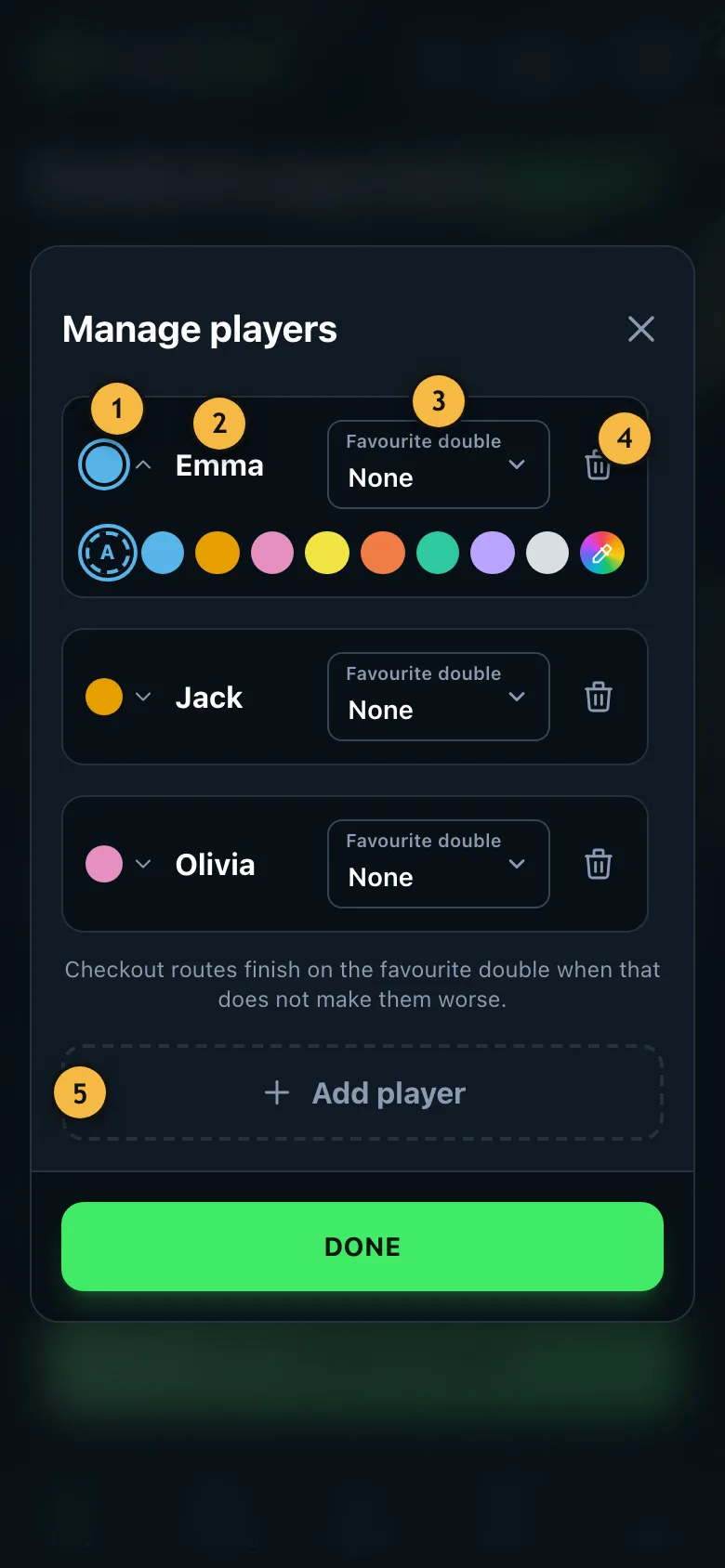
- The player's colour. Tap it to show the colours: “A” lets the app choose, the eyedropper opens the colour picker for a colour of your own.
- Tap a name field to change the name.
- The player's favourite double. Optional – "None" leaves it out.
- Removes the player from the list.
- Adds another player.
Add player
- On the home page, tap "Add player". "Manage players" opens.
- Tap "Add player" and replace the placeholder with the name.
- Tap "Done". The new player is selected straight away.
Who's playing?
Selected players have a tick and a coloured frame. The colour follows the player through the whole game so you can see at a glance whose turn it is. Players without a tick stay saved but don't play this time. You choose a player's colour under “Manage players”.
Favourite double and dart set
You can choose a favourite double for each player. The checkout help then also shows a route that ends on it. If you have added your darts as a dart set under Progress, you can also choose here which set the player throws with. The set is saved with every result, so later you can compare which darts suit you better.
Changing names during a game
Made a typo? In the game there is a pencil next to each name. It changes the name for this match only.
Your own profile
If you use an account, mark one player as "me" under Back up & sync data. Then the app knows which results are yours, for example for the statistics and your progress.
For doubles or team games, add every player individually and split them into teams under "More options". How that works is explained under Starting player, teams and handicap.